My Logo Language Journey
Click anywhere to listen to some tunes! 🎵
Before learning Python, Java, and SQL at university, I explored the LOGO programming language — one of the first coding tools I was introduced to in high school. We made use a site called Turtle Academy to code!
For our mid-term project, we had to create a logo for our initials using LOGO’s unique drawing commands. Before diving into the final logo project, we practiced by creating weekly drawings to get familiar with the syntax and logic.
Below are some of the creations I worked on. Hope you enjoy the showcase!

My Logo Design using Logo Language! (Click on the Logo to see the original source in Turtle Academy!)
TO DrawC setcolor 0 arc 180 250 pu fd 250 lt 180 fd 75 pd arc 180 75 pu fd 175 rt 180 arc 180 100 pu rt 180 fd 175 pd arc 180 75 END To DrawW setxy 45 -150 pu fd 60 pd arc 180 60 pu fd 120 pd arc 180 60 pu fd 60 lt 90 pd setxy 340 200 pu lt 90 fd 60 pd arc 180 60 pu fd 60 lt 90 pd setxy 200 100 pu rt 90 fd 40 pd arc 180 40 pu fd 40 pd setxy 90 200 pu fd 50 pd arc 180 50 END To DrawW2 setxy 70 -100 pu rt 90 fd 60 pd arc 180 60 pu fd 120 pd arc 180 60 pu fd 60 lt 90 pd setxy 360 250 pu lt 90 fd 60 pd arc 180 60 pu fd 60 lt 90 pd setxy 220 150 pu rt 90 fd 40 pd arc 180 40 pu fd 40 pd setxy 120 260 pu fd 55 pd arc 180 55 END To circle setcolor 0 setwidth 7 arc 360 20 setcolor 11 fill END To triangle setcolor 0 setwidth 5 repeat 3 [ rt 120 fd 35 ] END cs pu setxy -100 0 rt 180 pd setwidth 0 DrawC pu fd 25 rt 90 fd 90 pd setwidth 0 DrawW setwidth 10 pu fd 100 rt 90 fd 25 setcolor [ 2 3 2 ] fill pu rt 180 fd 180 rt 90 fd 50 lt 90 DrawC setcolor 11 pu fd 50 pd fill pu rt 180 fd 50 pd fill pu fd 300 fill setcolor [ 2 3 2 ] setwidth 10 pu lt 90 fd 120 lt 90 fd 350 pd DrawW2 setcolor 11 fill pu lt 90 fd 50 pd fill pu lt 90 fd 200 lt 90 fd 60 pd fill setcolor 0 pu rt 180 fd 50 rt 90 fd 40 fill pu rt 90 fd 300 fill pu lt 90 fd 100 fill setcolor [ 250 75 75 ] pu lt 90 fd 50 pd fill pu fd 50 pd triangle pu rt 90 fd 110 rt 90 fd 50 rt 105 pd triangle pu rt 75 fd 100 rt 90 fd 100 pd triangle pu fd 75 rt 90 fd 50 pd triangle pu lt 90 fd 75 rt 90 fd 50 rt 90 pd triangle pu rt 90 fd 120 pd triangle pu rt 90 fd 100 rt 90 fd 50 lt 20 pd triangle pu fd 50 pd triangle pu fd 50 rt 90 fd 50 pd triangle pu lt 70 fd 50 lt 90 fd 50 pd triangle pu rt 90 fd 320 lt 130 pd triangle pu rt 180 fd 100 rt 30 pd triangle pu rt 220 fd 100 pd triangle pu rt 150 fd 100 pd triangle pu rt 90 fd 600 lt 90 fd 300 pd triangle pu fd 70 rt 42 pd triangle pu rt 228 rt 90 fd 100 pd triangle pu lt 90 fd 50 rt 90 fd 25 rt 22 pd triangle pu fd 75 rt 78 pd triangle pu fd 20 lt 70 pd triangle pu fd 50 lt 180 pd triangle pu lt 30 rt 180 fd 25 lt 90 fd 100 lt 90 fd 25 pd triangle ht
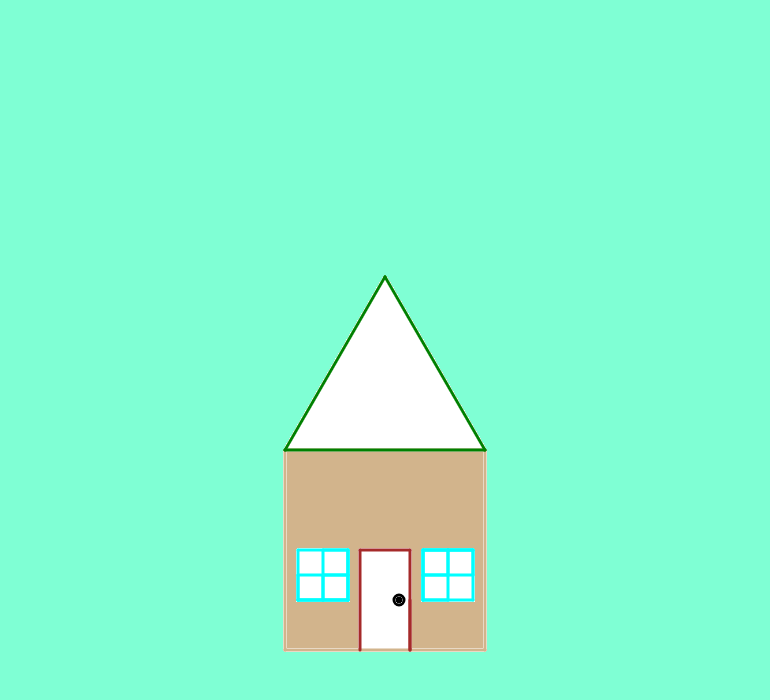
My House Logo (Click on the Logo to see the original source in Turtle Academy!)
cs To Roof setcolor 10 setwidth 3 repeat 3 [ rt 120 fd 200 ] setcolor 10 fill END To House setcolor 9 setwidth 3 repeat 4 [ rt 90 fd 200 ] END To Door setcolor 8 setwidth 3 rt 90 fd 100 rt 90 fd 50 rt 90 fd 100 setcolor 8 fill END To Doorknob setcolor 0 setwidth 3 arc 360 5 setcolor 0 fill END To Windows setcolor 3 setwidth 3 repeat 4 [ rt 90 fd 50 ] repeat 4 [ rt 90 fd 25 ] rt 90 fd 50 repeat 4 [ rt 90 fd 25 ] rt 90 fd 50 repeat 4 [ rt 90 fd 25 ] setcolor 3 fill END pu setxy -100 -100 pd House lt 90 Roof pu lt 90 fd 200 lt 90 fd 75 rt 180 pd Door rt 180 fd 50 pu lt 90 fd 11 pd Doorknob pu fd 39 rt 90 fd 50 lt 90 fd 12 rt 180 pd Windows pu rt 180 fd 125 pd rt 180 Windows pu seth 0 fd 20 pd setcolor 9 fill pu seth 90 fd 25 pd setcolor 11 fill pu seth 180 fd 25 seth 270 fd 25
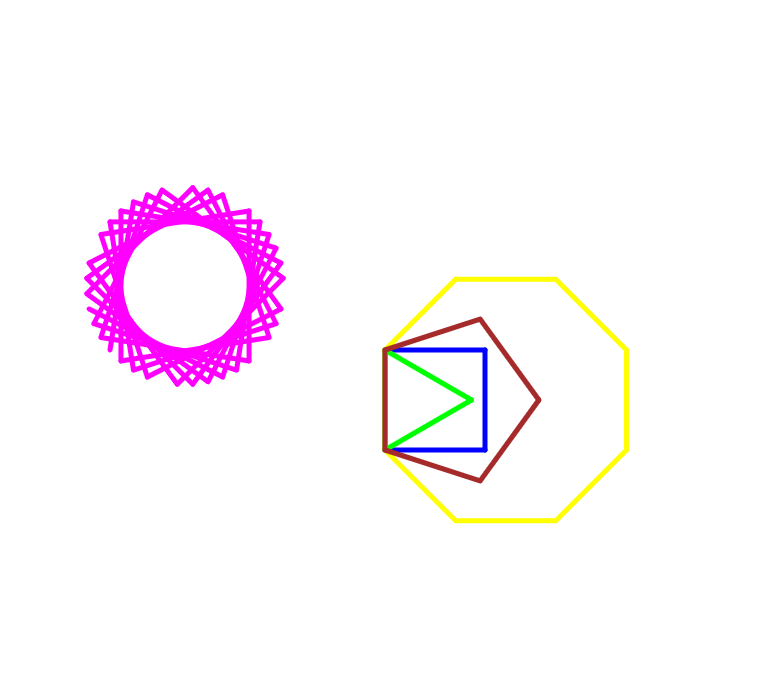
Polygon Project (Click on the Logo to see the original source in Turtle Academy!)
To Square repeat 4 [ rt 90 fd 100 ] END To Triangle repeat 3 [ rt 120 fd 100 ] END To Pentagon repeat 5 [ rt 72 fd 100 ] END To Octogon repeat 8 [ rt 45 fd 100 ] END To Flower setcolor 5 repeat 33 [ rt 99 fd 150 ] ENd cs Flower cs setwidth 5 setcolor 1 square setcolor 2 triangle setcolor 6 octogon setcolor 8 pentagon pu seth 270 fd 275 pd Flower